Add and Manage Members Without an Email
Create name-only profiles for relatives without an email address, and manage their Space access from their profile.
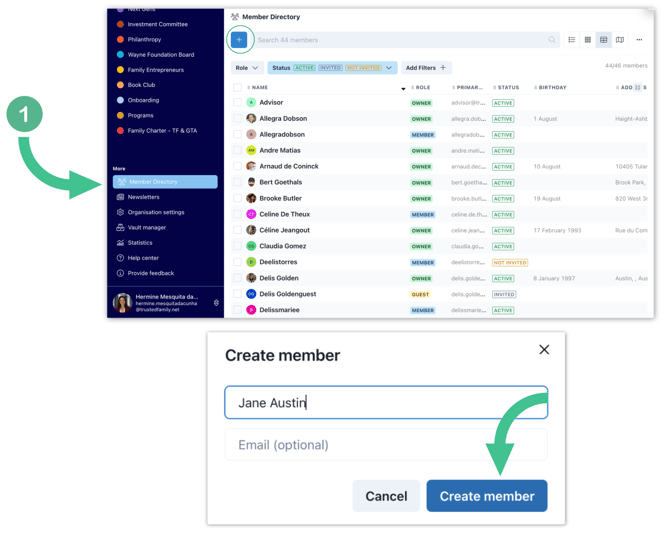
1) From the Member Directory in the screen, click the + button to create a new member. In the pop up window, enter the member's name and hit Create member — the email is now optional.

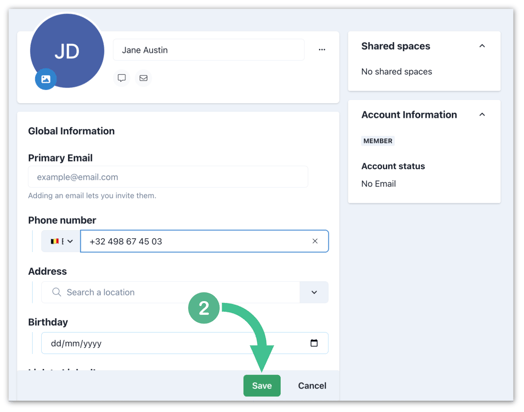
2) You're taken straight to the profile editing page, where you can fill any information on their profile. Add whatever you have now and select Save.
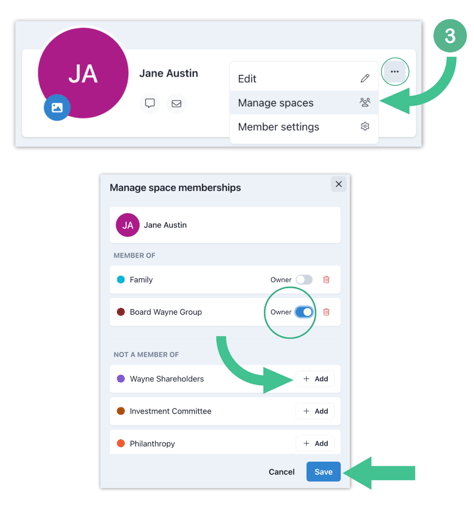
3) To manage a member's space access, click on the "..." icon next to their name and select Manage space. Using the toggle, you can give them Owner rights for each space.
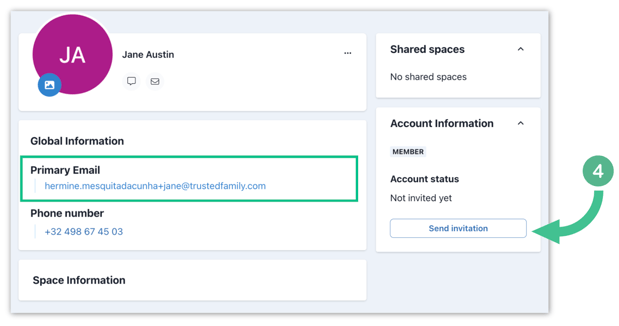
4) At any point in time, you can add an email to their profile. Once you save the modification, you'll see a Send Invitation button under Account Information, allowing you to send them an invite to join the platform.
Note: Members without an email get a No Email account status. From the Member Directory, expand the Status filter and check No Email to see just the members waiting for an email address.
Once an email is added, the status becomes Not invited yet. Follow this article on Mass Invite Members to Join the Platform to invite multiple members at once.
5) You can also create members from the Family Tree module. In your family space, select Family Tree in the modules, click the + button, and start typing a name in the Search by name, or type someone new... field. If the name isn't found, choose:
- + Family tree — creates a family-tree-only entry (won't appear in the Member Directory).
- + Family tree & Member directory — creates a linked entry in both, so the person also lands in your Member Directory.

6) After making your choice, confirm by hitting Add member in the pop up window. You're redirected to the side panel, where you can add Life events like birth, marriage, or death. If you selected + Family tree & Member directory, you can also click on their name in the tree to open their full profile and edit it.

Note: Follow this article on Add a member to the family tree for the full family tree walk-through.