
Create folders in vaults
Keep every vault tidy by building a folder structure that makes sense for your organization, whether that's by year, document type, or anything else.
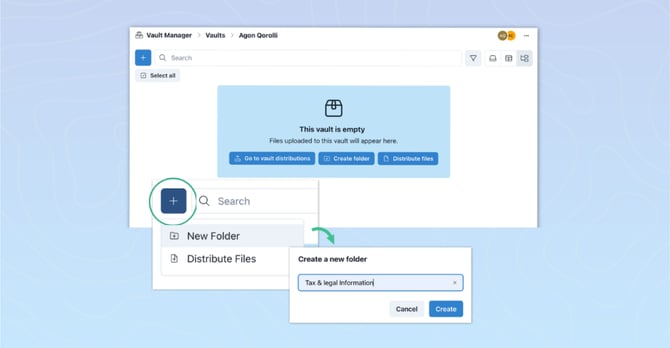
Distribute files directly into folders
When distributing files across multiple vaults at once, you can now choose exactly which folder each file lands in. If a folder doesn't exist yet in a recipient's vault, it's created automatically.
See how.png?width=670&height=349&name=product%20update%20pngs%20(15).png)
Import files directly from SharePoint
No more downloading and re-uploading. Distribute existing SharePoint documents straight to vaults and the right shareholders in just a few clicks.
See how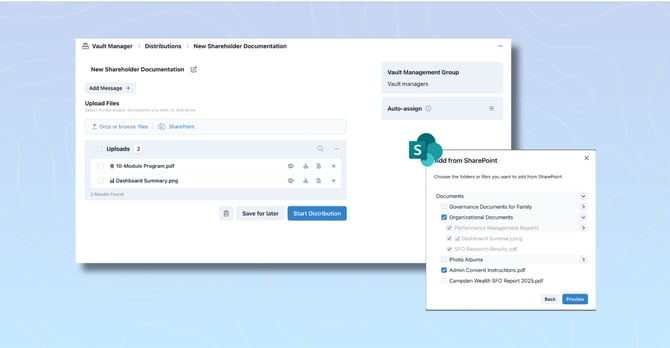
PDF annotations in files
Members can now add highlights, comments, and markups directly on PDF files, privately or shared with everyone who has access. As an admin, you can moderate or disable annotations on any file.

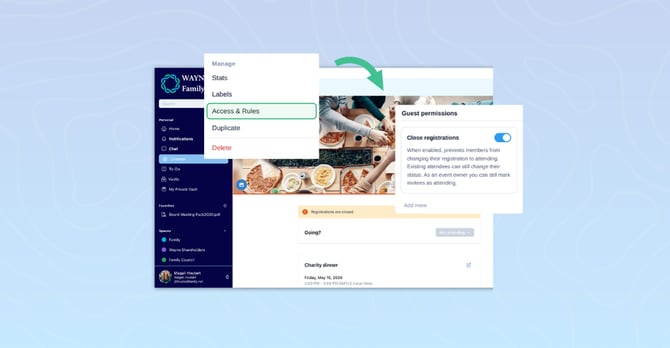
Close event registrations
Once your event is full, lock RSVPs with a single toggle in your event's Access & Rules settings. A banner will automatically notify members that registration is closed and you can still update individual responses manually if needed.
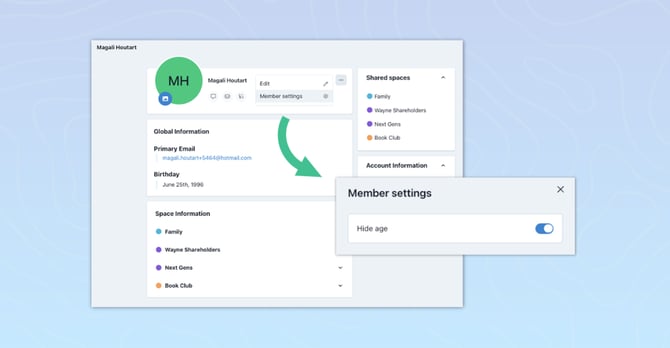
Hide a member's age
You can now hide a member's birth year directly from their profile settings, so only their month and day of birth appear across the platform. Members can also manage this themselves from their personal settings.
To get the latest product updates delivered directly to your inbox (no more than monthly), sign up for our Product Updates newsletter!
-1.png?width=96&height=64&name=Past%20Product%20Update%20Images%20(4)-1.png)
-1.png?width=96&height=64&name=Past%20Product%20Update%20Images%20(3)-1.png)
.png?width=96&height=64&name=Past%20Product%20Update%20Images%20(2).png)
.png?width=96&height=64&name=Past%20Product%20Update%20Images%20(1).png)